Showing posts with label active learning exercise. Show all posts

Tuesday, February 15, 2011

Virtual Campus Module 1: Creating, Editing and Managing Geodatabase

Due next week:

Module 1: Creating, Editing and Managing Geodatabases.

Instructions:
  1. Go to http://training.esri.com
  2. Login (create an account if you do not have one)
  3. Go to My Training
  4. Go to My Virtual Campus Courses
  5. Start a New Course
  6. Enter the code you got in class
  7. Complete Module 1
  8. I will look at it next week at the beginning of class.

Wednesday, December 3, 2008

Tuesday, October 16, 2007

More campus ...


Building polylines or polygons? Yeah, you guessed it -polygons. So, how do we go from the CAD polylines to polygons?


A great tool available at the Arc/Info license called Feature to Polygon. Check it out the screen shot.
Another great tool, if you did not have Arc/Info is an extension for the software called XTools Pro.
It has a lot of great free functionality but if you plan to use it past the evaluation period you'll need to buy it. This extension has all kinds of feature conversions, table operations, layer operations and more. Check it out!

Monday, October 15, 2007

Utilize the feature class created from CAD import to parsing out individual layers

Last class, we imported a CAD polyline feature class of the campus to a single feature class in our campus geodatabase. We also georeferenced this new feature class to real-world coordinates using the Spatial Adjust toolbar.

This new feature class had many different features of the campus like buildings, sidewalks, utility poles and other important data. These features can delineated based on the 'layer' they were on in the CAD file. This information is brought over to the GIS in a field called 'layer'.

This class, we will use the georeferenced data that we imported from CAD to a single feature class to parse out into individual features classes.

HOW?
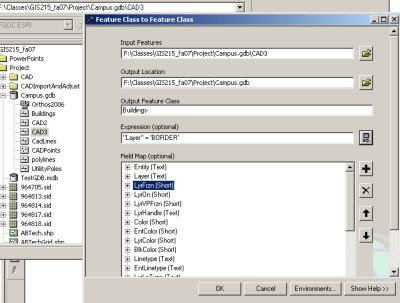
Utilize ArcCatalog to EXPORT layers. During the export using the query tool to select a subset of features to be exported to the new feature class. This will allow you to segregate features from individual CAD layer and export them to feature classes.

You should end up with individual feature classes in your geodatabase for buildings, sidewalks, utility poles, etc...

See graphic below for an example of how the dialog box should look for exporting the features from the buildings layer to a new Buildings feature class in the same geodatabase.